Applying for a driving license, renewing it, or checking vehicle details no longer requires standing in long queues at the RTO. The Government of India has made these services available online through platforms like Sarathi Parivahan Portal and Parivahan Sewa.
However, navigating these websites can feel confusing if you don’t know the process. That’s where this guide helps. It provides clear, step-by-step instructions for common tasks, whether it’s booking a driving test, downloading your license, or checking your RC, making everything quick and easy to follow.
All License Related Services on Sarathi Parivahan Portal
The Sarathi Parivahan Portal offers a wide range of driving licence services online, including learner’s licence application, Driving School, permanent DL issuance, licence renewal, duplicate DL, address change, driving test slot booking, international driving permit, and real-time application status tracking from anywhere in India.
Other Services on Sarathi Parivahan Portal
The Sarathi Parivahan Portal also includes additional digital services like mParivahan, PUCC verification, eChallan system, Vahan Green Sewa, and Fancy Number booking. These services help users manage vehicle documents, pollution checks, traffic fines, eco-friendly transport services, and special registration numbers online easily.
Parivahan Portal – Two Core Systems Explained
The Parivahan Sewa portal operates through two separate yet closely connected systems. Knowing how each system works helps users access the correct online service quickly and efficiently.
| System | Full Name | Primary Function |
| VAHAN | Vehicle Administration | Vehicle registration, RC issuance and renewal, ownership transfer, road tax payment, fitness certificate, NOC, hypothecation services, PUC, permits, and fancy number booking |
| SARATHI | Sarathi Driving Licence System | Learner’s licence application, permanent driving licence, DL renewal, duplicate DL, international driving permit, driving school licence, and driving test slot booking |
All these services can be accessed through the main Parivahan portal, though each category operates on its own dedicated subdomain for easier access and management:
- vahan.parivahan.gov.in: Used for vehicle-related services such as RC, registration, permits, and tax payment
- sarathi.parivahan.gov.in: Used for driving licence services including learner’s licence, DL renewal, and test slot booking
- echallan.parivahan.gov.in: Used to check and pay traffic violation challans online
Eligibility Criteria for Driving License
Learner’s License (LL)
- Minimum Age (gearless 2-wheeler): 16 years
- Minimum Age (geared bike or car): 18 years
- Required Documents: ID for age and address, passport-size photo, and signature
- Important: If you’re under 18, consent from a parent or guardian is mandatory
Permanent Driving License (DL)
- Minimum Age: 18 years
- Eligibility: Should have held a Learner’s Licence for at least 30 days
- Requirement: Must clear the driving test conducted by the RTO
Commercial Driving License (CDL)
- Minimum Age: 18 years (20+ in certain states)
- Education: At least 8th standard pass (varies by state)
- Eligibility: Must already have a valid LMV driving licence
- Medical: Requires a fitness certificate (Form 1A) from a registered doctor
International Driving Permit (IDP)
- Age: 18 years or above
- Eligibility: Must have a valid Indian permanent driving licence
- Additional: Passport and visa are mandatory
- Medical: Fitness certificate (Form 1A) required
Driving Licence Required Documents
Learner’s Licence (LL) – Required Documents
- Age proof (Aadhaar card, PAN card, birth certificate, etc.)
- Address proof (utility bill, Aadhaar, rent agreement, etc.)
- Passport-size photograph
- Signature specimen
- Parent/guardian consent letter (for applicants under 18)
- Form 1 – self-declaration of physical fitness
Permanent Driving Licence
- Valid Learner’s Licence
- Proof of age and address
- Passport-size photograph
- Driving licence application (Form 4)
- Driving test appointment/slot booking receipt
- Vehicle for the test (your own or provided by a driving school)
- Form 1 or Form 1A (medical fitness certificate, required if above 40 years of age)
Commercial Driving Licence
- Valid LMV (private) driving licence
- Proof of age and address
- Minimum 8th pass certificate (required in most states)
- Training certificate from an authorized driving school (Form 5)
- Passport-size photograph
- Form 1A (medical fitness certificate)
- Application Form 2
International Driving Permit (IDP)
- Valid Indian driving licence
- Valid passport and visa
- Proof of current residential address
- Passport-size photographs
- Copy of air ticket (required in some cases)
- Application Form 4A
- Form 1A (medical fitness certificate)
How to Apply for a Driving License (DL) on Sarathi Parivahan?
You can apply for a permanent driving licence online once you have held a valid learner’s licence for at least 30 days. The process is straightforward if you follow the steps carefully.
- Visit the official website: parivahan.gov.in
- Click on Online Services and select Driving Licence Related Services
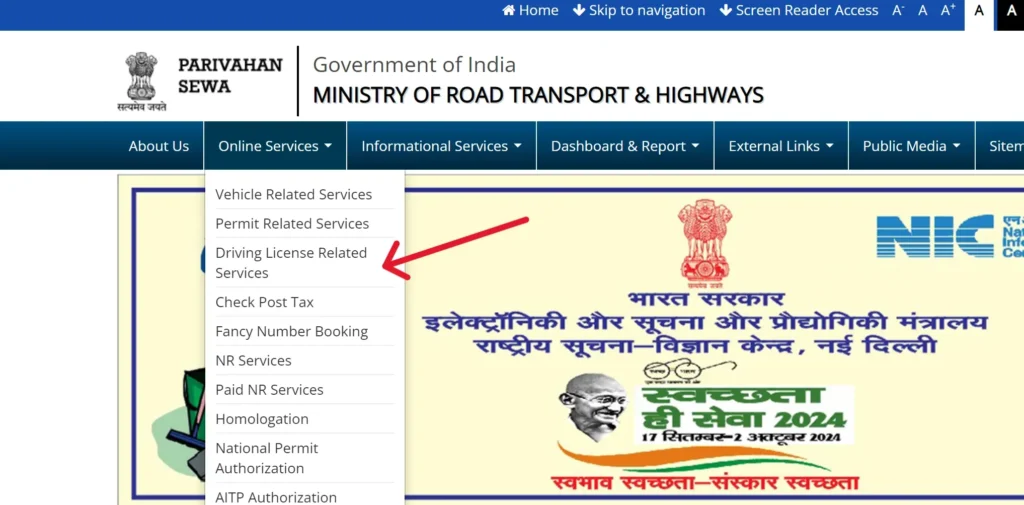
- Under Driving Licence Services, choose the option for a new driving licence
- Select New Learner’s Licence if you are applying for the first time
- Choose New Driving Licence if you already have a learner’s licence
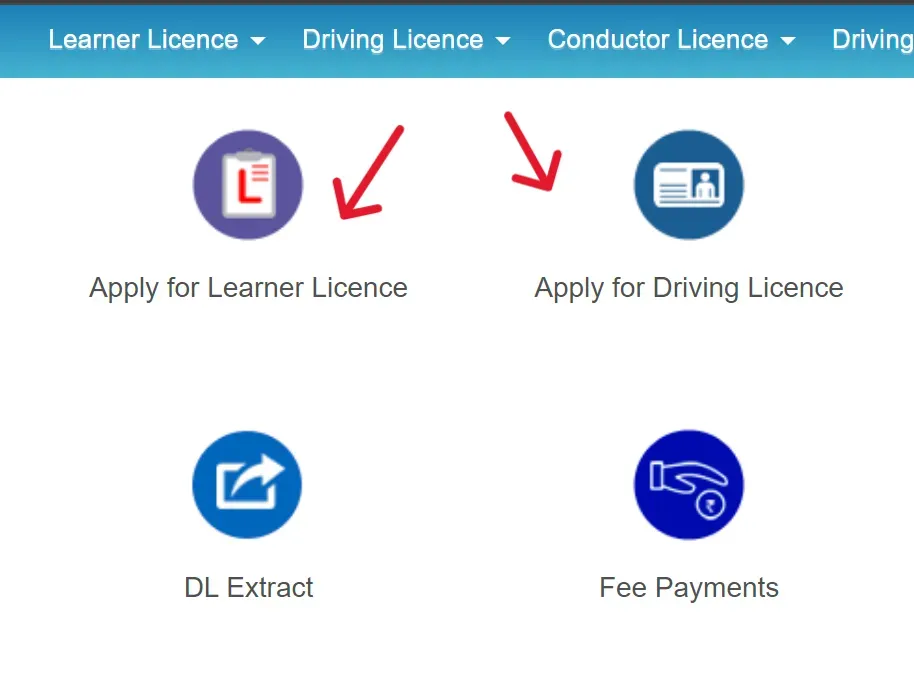
- Click on Continue to proceed
- Follow the on-screen instructions and enter your personal details
- Fill out the application form carefully
- Upload all required documents in the correct format and size
- Go to the Appointments section to book your driving test slot
- Select a suitable date and time for the test
- Pay the application fee using the available online payment options
- Visit the RTO office on the scheduled test day with original documents and receipt
- After passing the test, your permanent driving licence will be processed and issued
Driving Licence Fee Details in India
| Service Type | Fee (₹) |
| Learner’s Licence application (per vehicle class) | 150 |
| Learner’s Licence test or re-test | 50 |
| Driving skill test (per vehicle class) | 300 |
| Issuance of Permanent Driving Licence | 200 |
| International Driving Permit (IDP) | 1,000 |
| Add a new vehicle type to existing licence | 500 |
| Endorsement/Renewal for hazardous goods or transport licence | 1,000 |
| Driving Licence renewal (within validity) | 200 |
| DL renewal after grace period | 300 + ₹1,000/year of delay |
| Driving school licence (new or renewal) | 10,000 |
| Duplicate licence for driving school | 5,000 |
| Filing an appeal against RTO/licensing authority decision | 500 |
| Updating address or personal details in DL | 200 |
How to Check Driving Licence Status on Parivahan Portal
- Visit the official website: sarathi.parivahan.gov.in
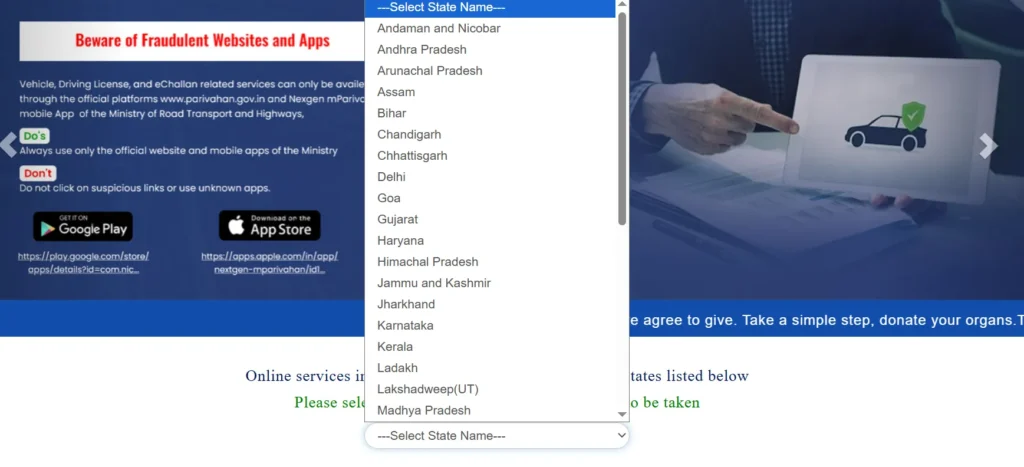
- On the homepage, select your state or union territory from the dropdown menu.
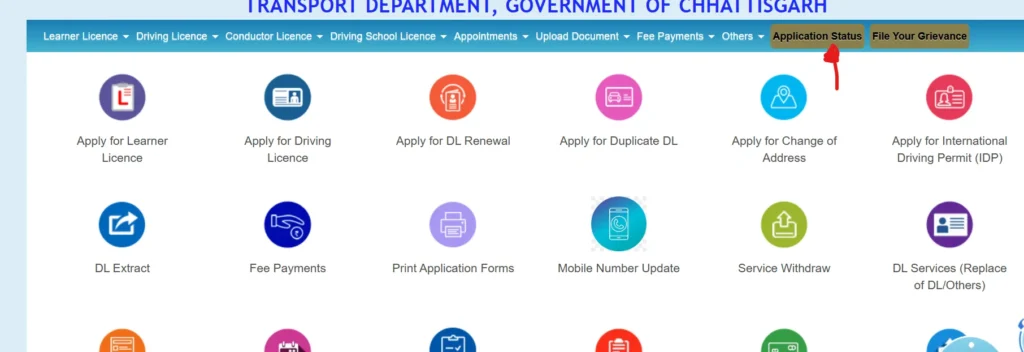
- Go to the Driving Licence Services section and click on Application Status.
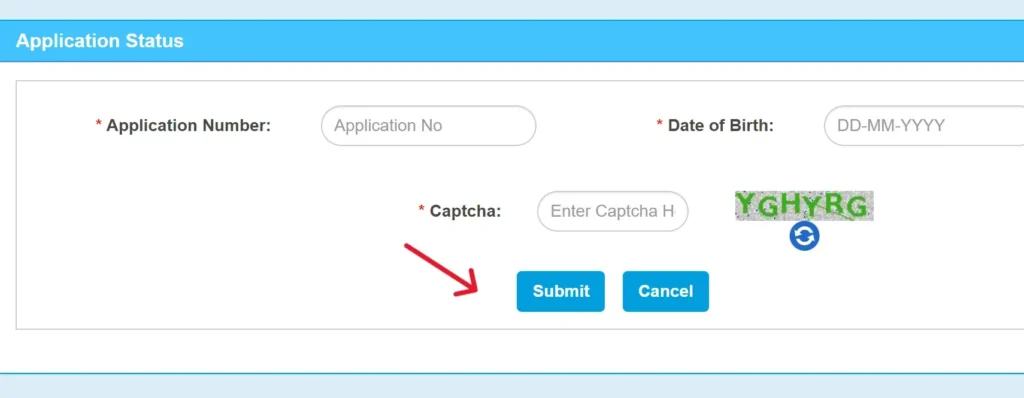
- Enter your Application Number and Date of Birth (in DD/MM/YYYY format).
- Click on Submit to view your driving licence status, such as under process, approved, dispatched, or rejected.
| Alternative Method: mParivahan App: You can also track your driving licence status through the mParivahan mobile app. Simply open the app, enter your DL number, and check the current status instantly. |
Complete Guide to Driving Licence Renewal (2026 Update)
Renewing your driving licence is not just a legal requirement, it also ensures your safety, keeps your insurance valid, and provides easy digital access to your documents. According to the Ministry of Road Transport and Highways (MoRTH) 2026 update, all states now support online DL renewal through the Sarathi Parivahan portal, reducing RTO visits by more than 70%.
When Should You Renew Your Driving Licence?
- Before Expiry: You can renew your driving licence up to one year before its expiry date.
- Grace Period: A 30-day grace period is allowed after expiry with no penalty.
- After Grace Period: If delayed beyond 30 days, a penalty of ₹300 plus ₹1,000 per year of delay will apply (as per the MoRTH fee update, July 2025).
Validity
- Private vehicles: Valid for 20 years or until the age of 50 (whichever comes first).
- Commercial vehicles: Valid for 3 to 5 years.
Who Can Renew
- You can renew if your license has not been expired for more than 5 years.
- If it is older than 5 years, you must apply for a new license.
Documents Required for Driving Licence Renewal
- Original driving licence (expired or close to expiry)
- Form 1 – self-declaration of physical fitness
- Form 1A – medical certificate (required for applicants aged 40+ or commercial licence holders)
- Recent passport-size photograph
Step-by-Step Driving Licence (DL) Renewal Process
- Visit the official website: sarathi.parivahan.gov.in
- Select your state or union territory from the dropdown menu
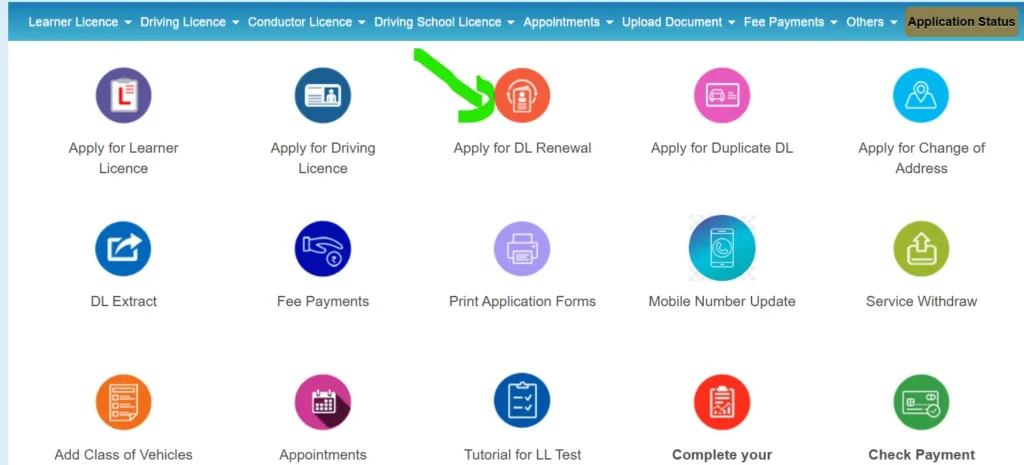
- Click on Apply for DL Renewal on the homepage
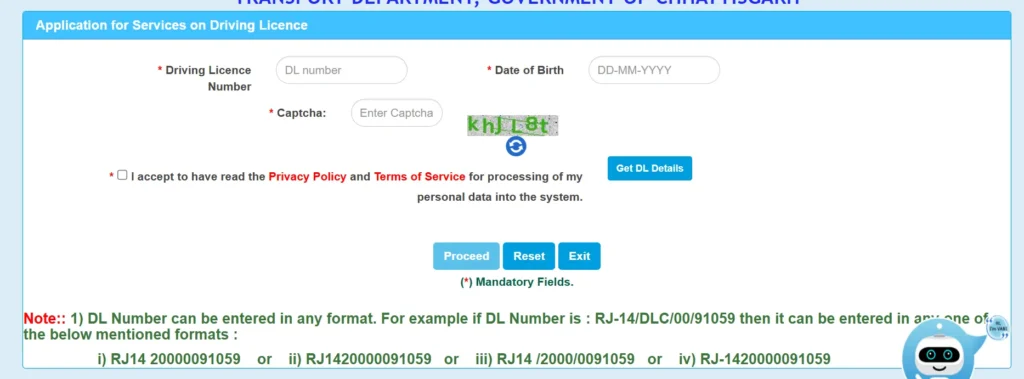
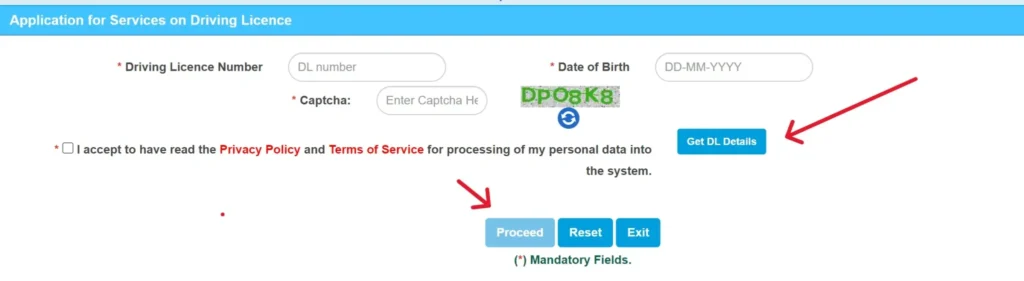
- Enter your DL number and date of birth to fetch your details
- Verify your information such as name, address, blood group, and photo
- Update details if required
- Upload the necessary documents:
- Form 1 or Form 1A (if applicable)
- Passport-size photograph
- Signature
- Address proof (if changed)
- Pay the renewal fee:
- ₹200 (if renewed before or within 30 days of expiry)
- ₹300 + ₹1,000 per year delay (if renewed after grace period, as per MoRTH July 2025 update)
- Complete payment using UPI, debit card, or net banking
- Save the acknowledgment number and payment receipt for future tracking
- In most cases, no visit to the RTO is required
- If needed (such as for a medical check), you will receive an SMS notification
Download it online via:
- DigiLocker (if Aadhaar linked)
- mParivahan app (enter your DL number)
Download your Driving Licence
- Go to parivahan.gov.in and open Online Services, then select Driving Licence Related Services.
- Choose your state to access the Sarathi dashboard.
- Under the Driving Licence section, click on Print Driving Licence.
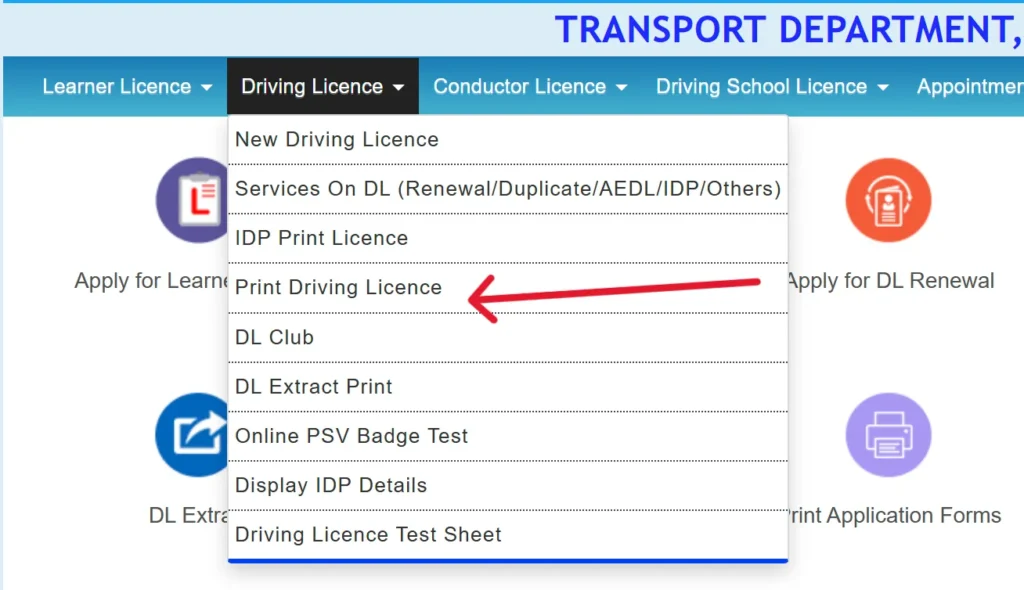
- Enter your Application Number and Date of Birth, then click Submit.
- Your licence details will appear on the screen—click Print to download or save it as a PDF.
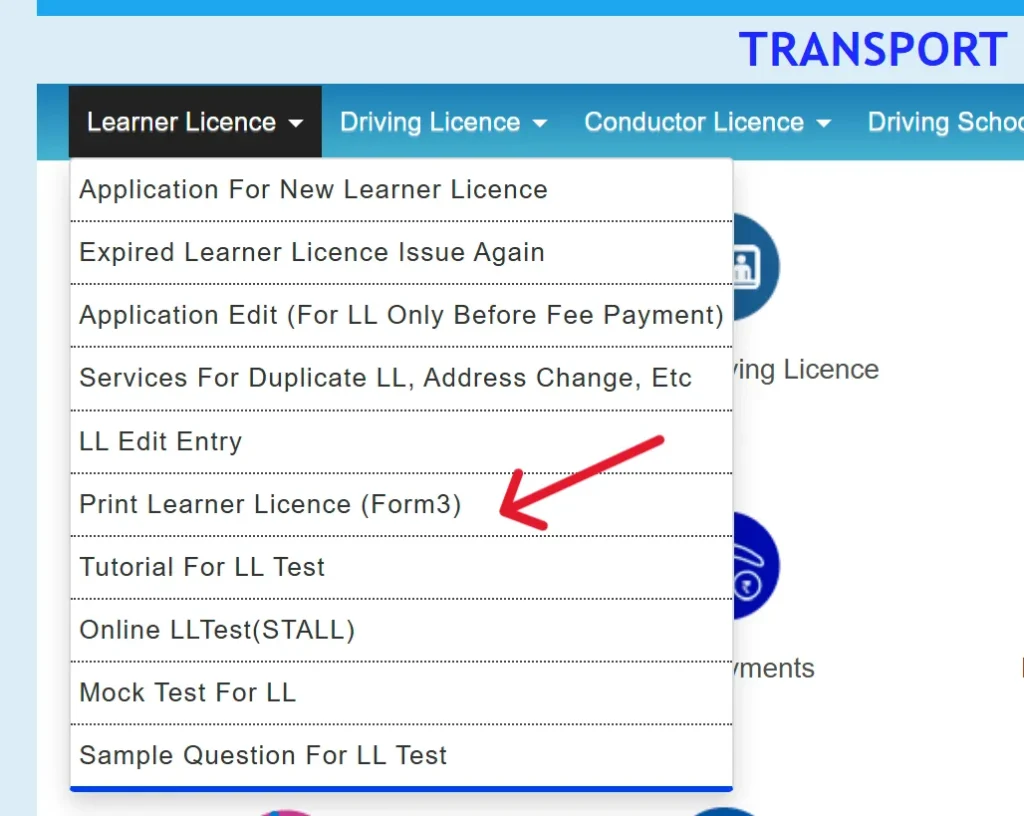
- For a learner’s licence, go to the Learner Licence section and select Print Learner’s Licence (Form-3).
Other Platforms to Download your DL
- mParivahan App – Lets you access your driving licence and RC directly on your mobile.
- DigiLocker – A government-authorized platform for securely storing and accessing digital documents.
DigiLocker
- Visit digilocker.gov.in or open the DigiLocker app.
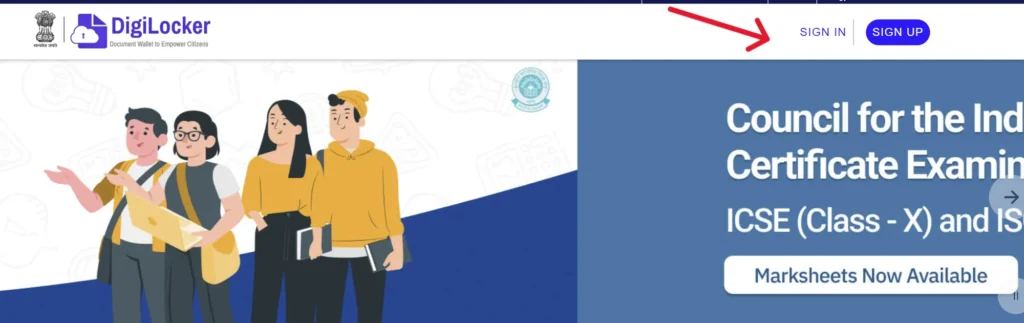
- Log in using your Aadhaar-linked mobile number.
- Enter the OTP sent to your registered number and click Submit.
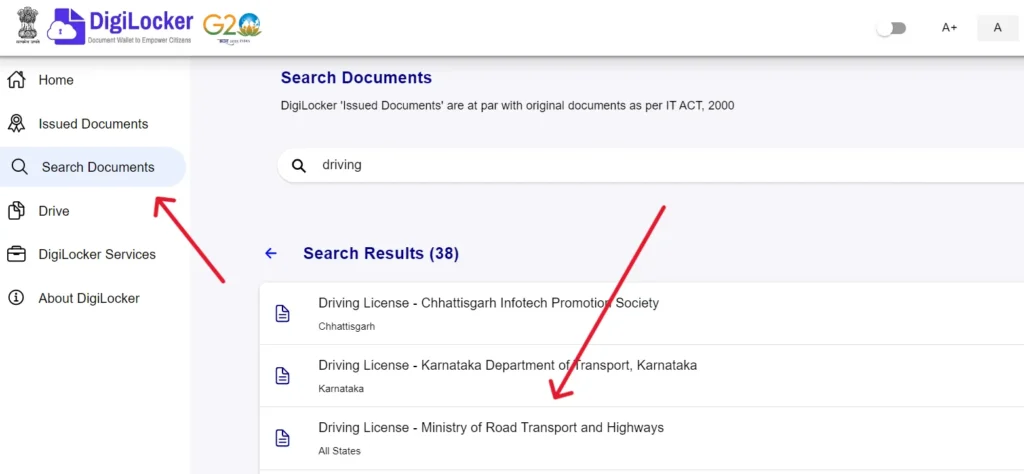
- After logging in, go to your dashboard and select Browse Documents.
- In the search bar, type Driving License and choose Driving License – Ministry of Road Transport and Highways from the list.
mParivahan App
- Download the mParivahan App: Open the Google Play Store or Apple App Store, search for mParivahan, and install it on your device.
- Open the App: Launch the app after installation and allow the necessary permissions for proper functionality.
- Register or Log In: If you’re a new user, sign up using your mobile number and verify it with the OTP. Existing users can simply log in with their credentials.
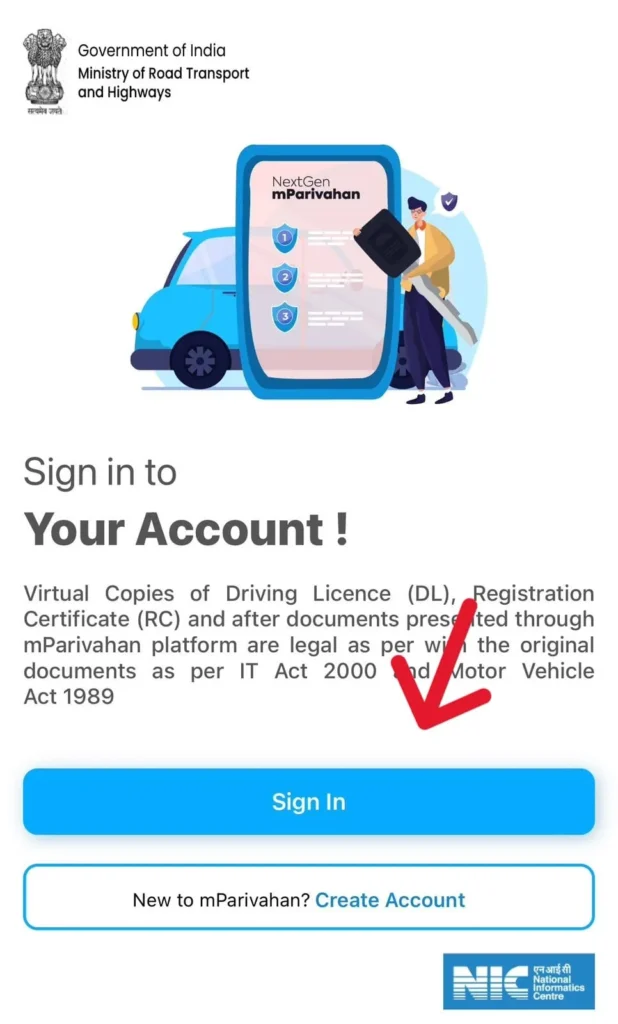
- Access Driving Licence Section: Navigate to the driving licence section within the app.
- Enter Required Details: Provide the necessary information, such as your date of birth and DL details.
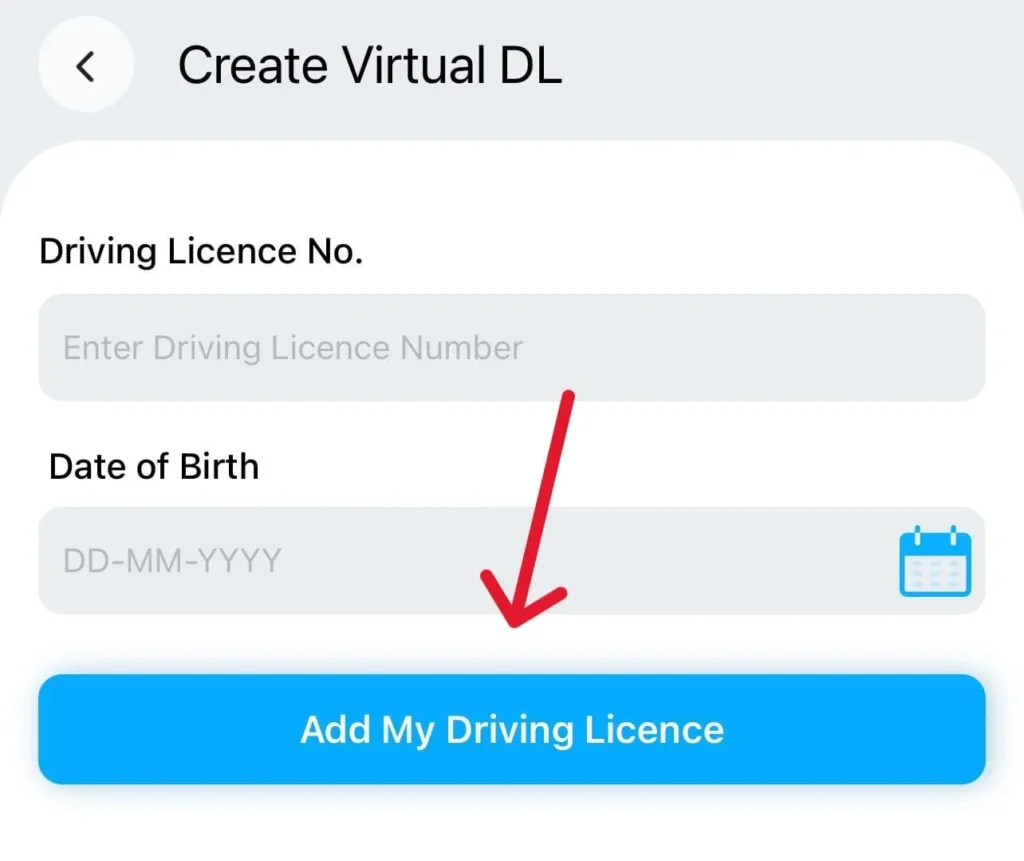
- Add Driving Licence: Tap on Add Driving Licence, and your virtual DL will be available for use.
Duplicate Driving Licence
Losing your driving licence can be inconvenient, but the Sarathi Parivahan Portal allows you to apply for a duplicate DL easily online. Whether your licence is lost, stolen, damaged, or unreadable, you can submit your application without visiting the RTO in most cases, unless verification is required.
Eligibility
- You must hold a valid driving licence (either active or expired).
- An FIR copy is required if the licence is lost or stolen.
- An Aadhaar-linked driving licence is preferred for quicker processing.
Documents Required
- Form LLD – Application for reporting the loss or damage of a driving licence
- Copy of FIR or police report (required if the licence is lost or stolen)
- Original driving licence (if damaged or worn out)
- Photocopy of the driving licence (if available)
- Passport-size photographs
- Self-attested proof of age and address
- Challan clearance report (mandatory for commercial licences)
- Fee payment receipt.
How to Apply for Duplicate DL Online?
- Visit the official website: parivahan.gov.in
- Select your state and click on Apply for Duplicate Driving Licence.
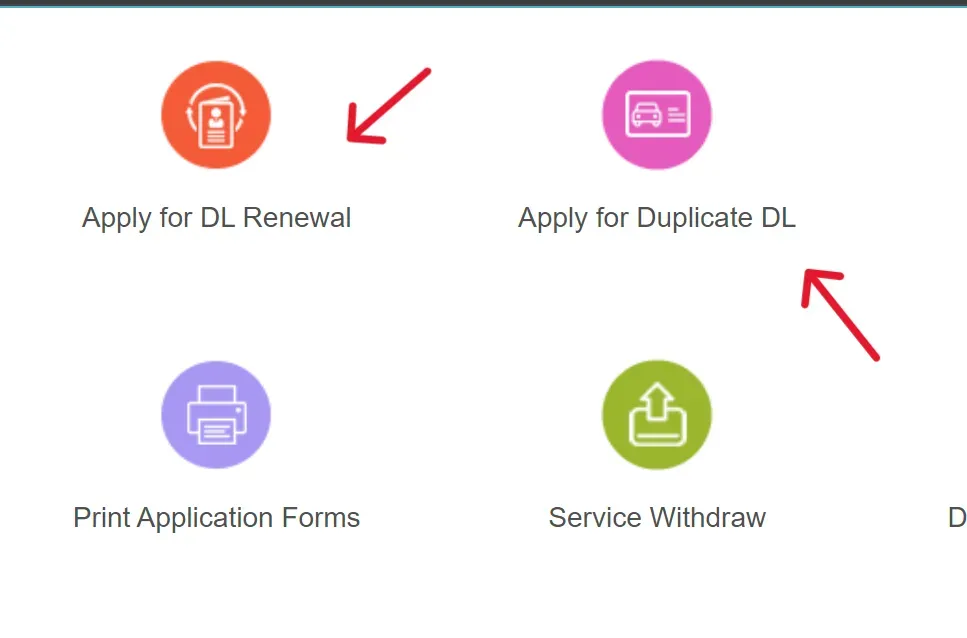
- Enter your driving licence number and date of birth.
- Upload all the required documents.
- Pay the applicable fee (₹200).
- Submit the application and download the acknowledgment receipt.
How You’ll Receive It
- Your virtual driving licence will be available within 3 to 5 days on mParivahan or DigiLocker.
- The physical copy of your DL will be delivered within approximately one week.
Parivahan Sewa: Vehicle Services & eChallan
The Parivahan Sewa portal is a digital platform that offers a wide range of vehicle-related services to citizens across India. Using this portal, people can easily access services such as vehicle registration, road tax payments, permits, driving licence services, and traffic challan management without needing to visit the transport office physically.
How to Access Vehicle-Related Services on Parivahan?
- Visit the official Parivahan website at Parivahan Portal
- Click on the “Online Services” option and choose “Vehicle Related Services.”
- Select your respective state from the list provided on the screen.
- The Vahan Citizen Services portal will open automatically.
- Enter your Vehicle Registration Number, State Name, and RTO details.
- Click on the “Proceed” button to access all available vehicle-related online services.
How to Check the Status of an e-Challan?
- Visit the official Parivahan website at parivahan.gov.in/
- Click on “Online Services” and select the “eChallan” option to access online traffic challan services.
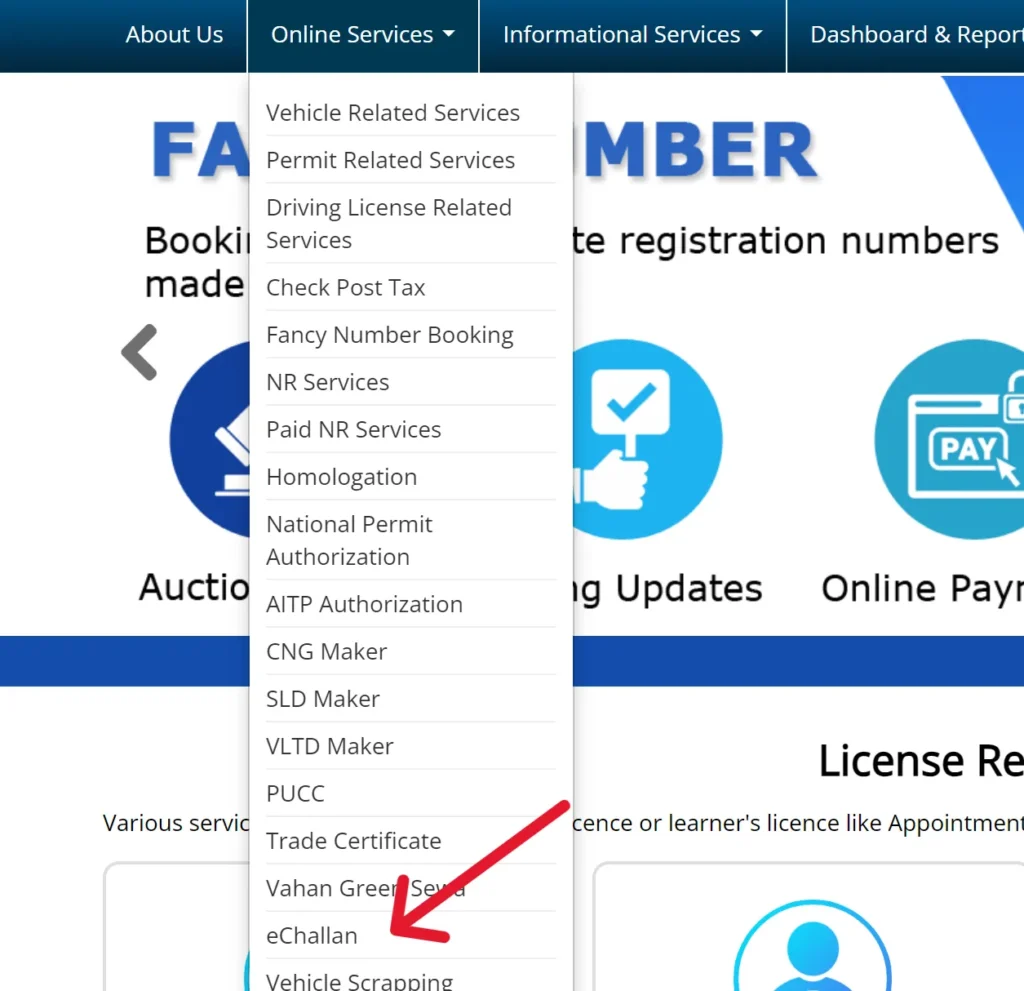
- A new page will open at eChallan Portal
- On the homepage, click on “Check Online Services” from the menu bar and choose “Check Challan Status.”
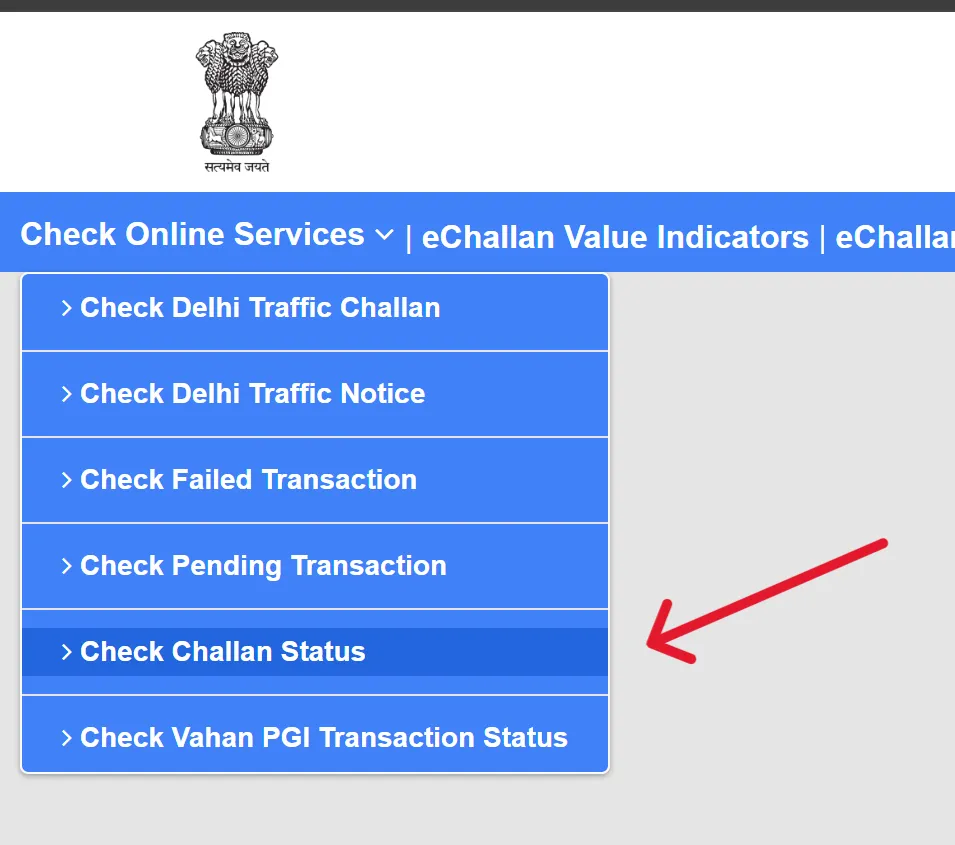
- Enter the required details such as your Challan Number, Driving Licence Number, or Vehicle Registration Number.
- After filling in the details, click on the “Get Details” button.
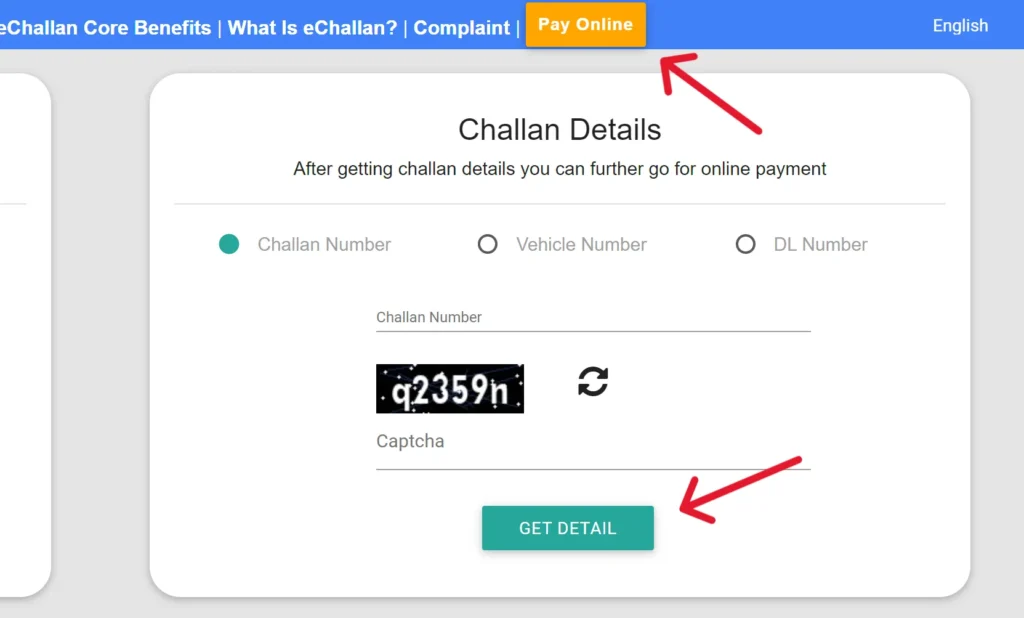
- Your challan information will appear on the screen, and you can easily pay the traffic fine online through the portal.
How to Pay e-Challan Online – Step-by-Step?
- Visit the official echallan.parivahan.gov.in
- Check your challan details by following the process mentioned earlier.
- Click on the “Pay Now” option available next to the pending challan.
- Select your preferred payment method, such as:
- UPI (Google Pay, PhonePe, Paytm, etc.)
- Debit Card or Credit Card
- Net Banking
- Complete the payment process and download the payment receipt for future reference.
- Once the transaction is successful, you will receive an SMS confirmation on your registered mobile number.
Complete List of Services Available on the Vahan Parivahan Portal
Vehicle Registration Services on the VAHAN Portal
The VAHAN portal handles the entire vehicle registration process across India. Every vehicle registered in any state is recorded in this centralised system, making it the official database for vehicle ownership details, insurance status, fitness certificates, road tax records, and other registration-related information.
| Service | Description |
| New Vehicle Registration | Register a newly purchased vehicle at the concerned state RTO |
| RC Renewal | Renew a Registration Certificate that has expired or is about to expire |
| Duplicate RC | Request a duplicate Registration Certificate if the original is lost, stolen, or damaged |
| Transfer of Ownership | Transfer vehicle ownership during the sale or purchase of a used vehicle |
| Hypothecation Addition | Add the lender’s name to the RC when purchasing a vehicle through a loan |
| Hypothecation Removal | Remove the bank or finance company’s name from the RC after full loan repayment |
| Address Change in RC | Update the owner’s residential address in the Registration Certificate |
| No Objection Certificate (NOC) | Obtain an NOC for transferring or re-registering a vehicle in another state |
| Fitness Certificate (FC) | Mandatory fitness approval required for commercial and transport vehicles |
| Duplicate Fitness Certificate | Apply for a duplicate FC if the original certificate is missing or damaged |
| PUC Certificate Verification | Check the validity status of the Pollution Under Control certificate online |
| Road Tax Payment | Pay state road tax and interstate permit or check-post charges online |
| Fancy Number Booking | Reserve a special or preferred vehicle registration number |
| Vehicle Scrapping Service | Register old or end-of-life vehicles for authorised scrapping |
| National Permit Authorisation | Permit allowing commercial vehicles to operate across multiple states |
| AITP Authorisation | All India Tourist Permit for tourist and passenger transport vehicles |
| Vehicle Insurance Verification | Check the insurance status of a registered vehicle online |
| VLTD Registration | Compliance registration for Vehicle Location Tracking Devices in commercial vehicles |
| Trade Certificate | Certificate issued to approved automobile dealers for vehicle trade purposes |
Driving Licence Services – SARATHI Portal
| Service | Description |
| Learner’s Licence (LL) Application | Initial licence required before applying for a permanent driving licence |
| Permanent Driving Licence (DL) | Official driving licence issued after successfully passing the driving test |
| DL Test Slot Booking | Schedule a date and time for the practical driving test at the RTO |
| Driving Licence Renewal | Renew a driving licence that is expired or nearing expiry |
| Duplicate Driving Licence | Apply for a replacement DL if the original is lost, stolen, or damaged |
| International Driving Permit (IDP) | Permit that allows Indian citizens to drive legally in foreign countries |
| Addition of Vehicle Class | Add another vehicle category to an existing driving licence |
| Change of Address in DL | Update the residential address mentioned on the driving licence |
| Driving School Licence | Apply for or renew a licence for operating a registered driving school |
| DL Application Status Check | Track the current status of a driving licence application online |
| DL Extract | Download or print detailed information related to the driving licence |
eChallan Services
| Service | Description |
| eChallan Status Check | Search and view pending traffic challans using the challan number, vehicle number, or driving licence number |
| Online eChallan Payment | Pay traffic violation fines online through UPI, debit/credit cards, or net banking |
| Challan History | View complete challan records issued against a vehicle registration number or driving licence |
Parivahan Portal Features
| What It Offers | How It Helps You |
| Centralized Online Access | A one-stop digital platform for all driving license and vehicle-related tasks. |
| Covers All of India | Works in every state and union territory with no regional restrictions. |
| Services in One Place | From applying for a learner’s license to paying traffic fines, everything is online. |
| Easy for Citizens | Open to anyone with basic ID or Aadhaar, with no complicated signups required. |
| Mobile-Friendly Tools | Access services on the go through the official mParivahan app (Android & iOS). |
| Verified Government Sites | Use trusted portals like parivahan.gov.in and sarathi.parivahan.gov.in. |
Popular Services Available on Parivahan Sewa Portal
| Service | Sarathi Parivahan ✅ | Parivahan Sewa ✅ |
| Apply for Learner’s License | ✅ | ❌ |
| Apply for Driving License | ✅ | ❌ |
| Driving License Renewal | ✅ | ❌ |
| Driving Test Slot Booking | ✅ | ❌ |
| Download DL or LL | ✅ | ❌ |
| Vehicle Registration | ❌ | ✅ |
| Transfer of Vehicle Ownership | ❌ | ✅ |
| Registration Certificate (RC) Status | ❌ | ✅ |
| Pay eChallan | ❌ | ✅ |
| Apply for Vehicle Permits | ❌ | ✅ |
| Update Address in DL | ✅ | ❌ |
| Check Driving License Status | ✅ | ❌ |
Different Types of Driving Licenses in India
- Learner’s Licence (LL): A temporary licence for beginners that allows you to practice driving legally. It is valid for 6 months and is mandatory before applying for a permanent licence.
- Permanent Driving Licence: Issued after successfully passing the driving test. It permits you to drive private vehicles such as cars and two-wheelers across India.
- Commercial Driving Licence: Required for driving vehicles used for commercial purposes like trucks, taxis, and buses. It involves specialized training and a medical fitness test.
- International Driving Permit (IDP): Enables you to drive in foreign countries. It is valid for 1 year and can only be obtained if you already hold a valid Indian driving licence.
Forms and Helpful links
Driving Licence
- Form 1: Self-declaration of physical fitness for non-transport vehicles.
- Form 1A: Medical Certificate for transport vehicles.
- Form 2: Application for the grant or renewal of a driving license.
- Form 3: Learner’s License.
- Form 4A: Application for the grant of a driving license.
- Form 5: Driving Certificate issued by a driving school or establishment.
- Form 8: Application for adding a new class of vehicle to a driving license.
- Form 9: Application for renewal of a driving license.
Vehicle
- Form 25: Application for renewal of vehicle registration certificate (RC).
- Form 26: Application for duplicate vehicle registration certificate.
- Form 28: No Objection Certificate (NOC) for vehicle transfer.
- Form 29: Notice of transfer of vehicle ownership.
- Form 30: Application for the transfer of vehicle ownership.
- Form 35: Application for termination of a hypothecation (loan) on a vehicle.
Contact Details
| Contact Service | Details |
| Vehicle Issues | Email: helpdesk-vahan@gov.in |
| Driving Licence Issues | Email: helpdesk-sarathi@gov.in |
| General Inquiries | Call: +91-120-4925505 |
| App (mParivahan) Issues | Email: helpdesk-mparivahan@gov.in |
| Traffic Fine (eChallan) | Email: helpdesk-echallan@gov.in |
| Website Feedback | Email: wim.rth@nic.in |
Frequently Asked Questions (FAQs)
What is Parivahan Sewa?
Parivahan Sewa is an official digital platform launched by the Government of India that offers various vehicle and driving licence-related services online.
How can I apply for a driving licence online?
Visit sarathi.parivahan.gov.in, select your state, fill out the online application form, upload the required documents, pay the application fee, and book a driving test slot.
How can I check my vehicle registration details?
Go to parivahan.gov.in, choose Vehicle Related Services, enter your vehicle registration number, and view the registration details online.
How can I check and pay my eChallan online?
Visit echallan.parivahan.gov.in, enter your vehicle number or challan number, check the challan details, and pay the fine online.
Can I renew my driving licence through Parivahan Sewa?
Yes, you can renew your driving licence online through the portal. Simply select Driving Licence Related Services, apply for renewal, upload the required documents, pay the fee, and complete verification if required.
Is a digital driving licence valid during traffic checks?
Yes, the digital driving licence available on DigiLocker or the mParivahan app is legally accepted across India. You can show the digital version during traffic verification instead of carrying the physical copy.
What should I do if I forget my driving licence application number?
If you forget your application number, you can recover it through the Parivahan Sewa portal using your registered mobile number, email ID, or other application details.
Can I download my driving licence online?
Yes, you can download your driving licence through the Sarathi Parivahan portal, DigiLocker, or the mParivahan app.
How long does it take to receive a driving licence after passing the test?
In most states, the virtual driving licence becomes available within a few days, while the physical copy is usually delivered within 1 to 3 weeks.
Is Aadhaar mandatory for driving licence services?
Aadhaar is not compulsory in every case, but linking Aadhaar helps speed up verification and online processing.